Once you pass a dozen decks, the deck list becomes a filing problem. Deck Builder’s search already matched names, games and descriptions; version 3.10.0 turns it into a real finding tool with a filter sheet for duplicates and tags.
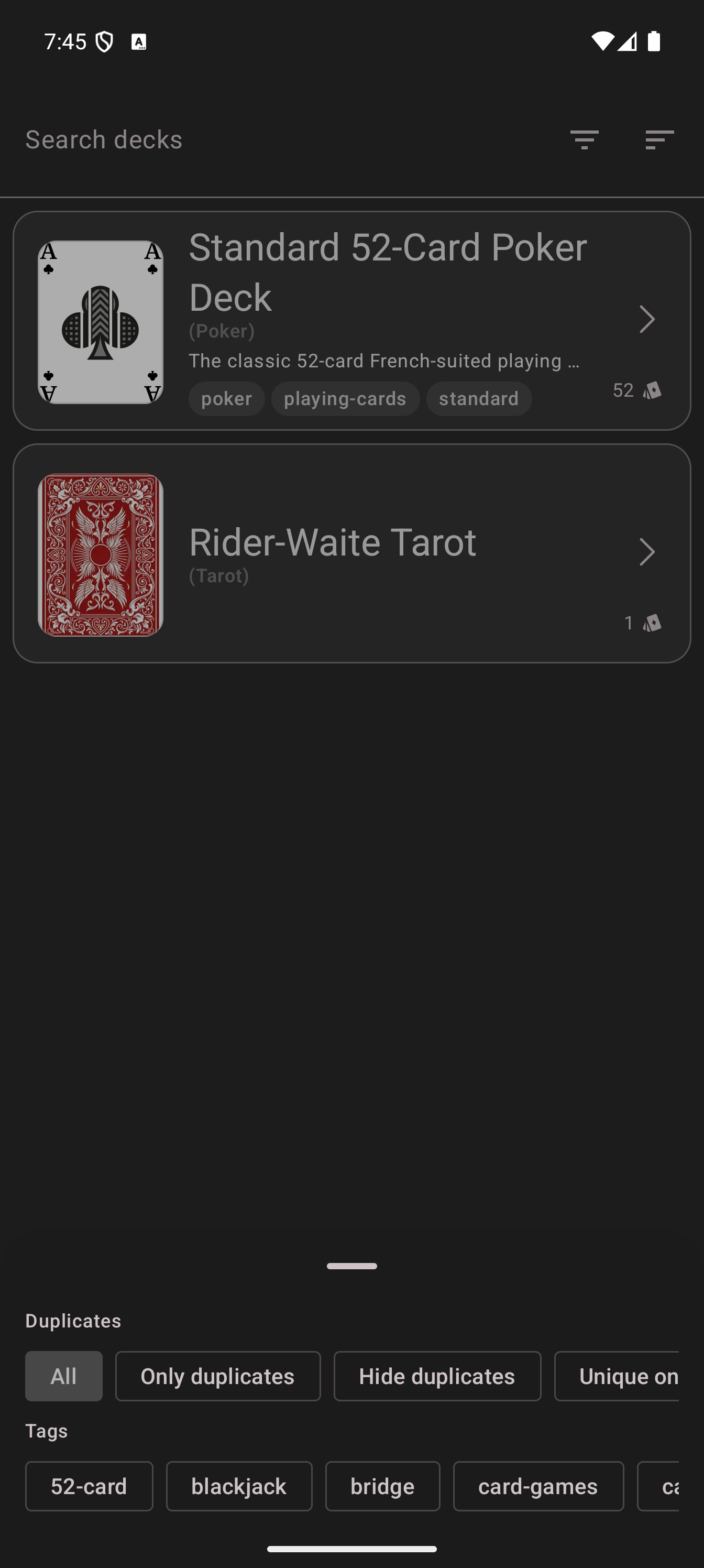
Opening the filters
From the deck overview, open the menu and tap Search decks, then tap the filter icon in the search bar. The filter sheet has two sections:
Duplicates filters the list by how many copies of the same deck you hold:
- All shows everything (default)
- Only duplicates narrows to decks that exist more than once, the cleanup view
- Hide duplicates keeps one entry per duplicate group, the tidy view
- Unique on filters by the field that defines a duplicate (name by default)
Tags lists every tag in your collection as a filter chip. Tap one or more chips and the list narrows to decks carrying those tags. A deck with the tags “tarot”, “esoteric” and “beginner” surfaces for any of the three.
Search matches tags now
The search box itself got smarter too: it matches tag names, not just titles and descriptions. Typing “tarot” finds your tarot decks whether the word is in the deck name, its game, its description or its tags. Combined with the tag chips, “the deck I tagged for two-player games” is one tap away.
Why duplicates got their own filter
Copy a deck to experiment with it, download a deck you already built, import a friend’s version: duplicates pile up quietly. The duplicates filter makes them visible in one tap so you can review and delete the stale copies, and the x2 count badges in the deck grid (also new in 3.10.0) show which decks hold several copies of the same cards.
The filter sheet is live on Android and the web app in 3.10.0. Deck Builder is free on Google Play, and the web app carries the same search. Join the Discord to tell us what should be filterable next, or support development on Patreon.
