Deck Builder 3.8.0 is the release where Deck Builder stops being an Android-only app. The web app at app.deckbuilderapp.app is now a full version of the product, in all 17 languages, with nothing to install. On Android, you can share and import card files in batches, and Pro now belongs to your account rather than to one device. Here is what changed.
Deck Builder now runs in your browser
Open app.deckbuilderapp.app on a laptop, a desktop or a tablet and you get the real thing: build decks, design cards, import a CSV, shuffle with all five shuffle modes, play with the hand, discard and in-play zones, print at real card size, and browse or publish to the Deck Store.
It speaks all 17 languages the Android app does, picked automatically from your browser and changeable in Settings, and it carries the same twelve colour schemes.
Two guides cover it in depth: building a deck in your browser walks through the whole flow from empty deck to playable, and what a custom deck builder is covers the wider picture of designing your own deck on either platform.
A few things stay on the phone, and it is worth being straight about them: scanning physical cards and the Magic card scanner use on-device machine learning with no browser equivalent, CSV import auto-maps columns rather than letting you map them by hand, and uploaded art is downscaled where Android keeps the original.
Pro follows your account, not your device
Pro is now tied to the account you sign in with. Buy it on Android and it applies in the browser; buy it in the browser through our web checkout and it applies on your phone. Signing in is what carries it across, and cloud sync then merges decks, cards and collections both ways.
This also fixes a real problem: a purchase that occasionally granted no entitlement now reports the failure and retries instead of silently leaving you without the thing you paid for.
Share several cards at once, and import them in batches
Card files (.dbpc) keep a card’s full design, including its Card Designer scene, so it can be reopened and edited elsewhere. Until now you moved them one at a time.
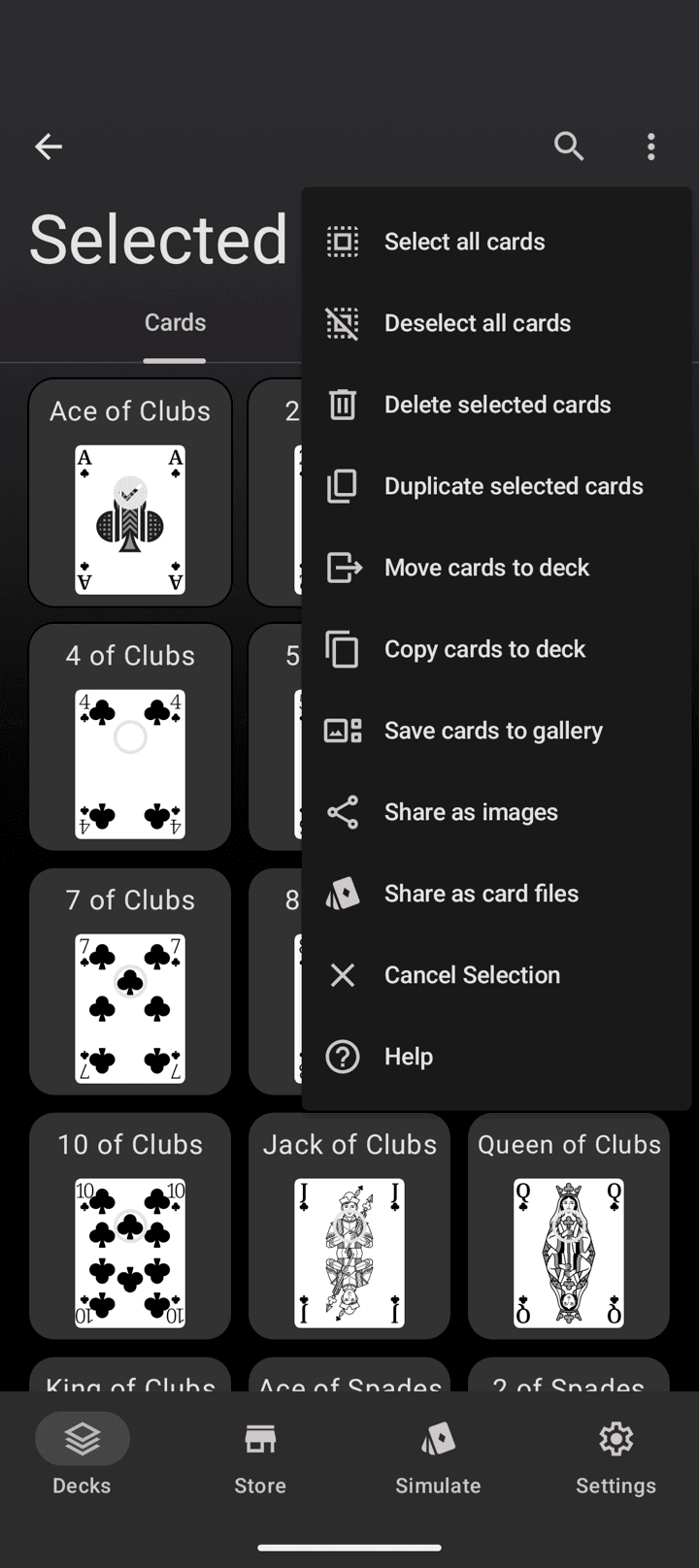
Select the cards you want, open the menu, and Share as card files hands you one file per card in a single share. The import route accepts several at once too: pick a batch, and Deck Builder imports them in sequence, skips anything that is not a card file, and tells you how many landed.
Reminders that do not repeat themselves
The optional re-engagement reminders used to stop after day 7. They now reach day 14 and day 30, and each offset has its own wording, so a month of reminders does not read like the same sentence five times. They remain entirely optional and can be turned off in Settings.
Fixes
- Designed cards keep their scene and artwork through an export and back.
- Large card exports no longer freeze the screen while they run.
- A Pro purchase that granted no entitlement is reported and retried.
- Card files round-trip correctly between the web app and Android.
Privacy policy
The privacy policy now covers the web app: what it stores in your browser, the consent-gated analytics and error reports, and the processors involved in a web purchase. Nothing changed for existing Android users, and the new processing is opt-in. Read it here.
Update from Google Play to get 3.8.0, or just open the web app and start building.
